Надежные данные позиционирования — это сердце современных навигационных систем.. Сегодня многие промышленные приложения полагаются на конкретное аппаратное решение.. Они используют встроенный модуль GPS G-Mouse для отслеживания и синхронизации.. Эти устройства объединяют антенну и приемник в одном блоке.. Они очень удобны, но требуют надлежащего ухода, чтобы оставаться точными..
Факторы окружающей среды могут постепенно ухудшать качество вашего сигнала с течением времени.. Пыль, влага, и вибрация часто воздействуют на чувствительные внутренние датчики. В этом руководстве, мы изучаем основные стратегии обслуживания вашего оборудования. Мы покажем вам, как обеспечить стабильные результаты позиционирования. Позвольте нам защитить ваши инвестиции в навигацию на долгие годы.
Обеспечение оптимального приема и размещения сигнала
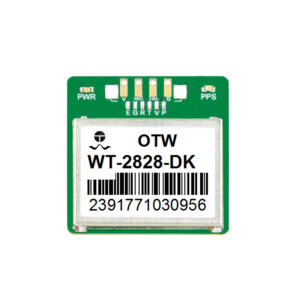
Расположение вашего модуля определяет его базовую производительность.. Встроенный модуль GPS G-Mouse требует четкого обзора неба.. Препятствия часто вызывают “ошибки многолучевого распространения” которые ухудшают точность ваших данных.
Как избежать помех сигнала
Держите модуль вдали от мощных электронных компонентов.. Такие устройства, как маршрутизаторы Wi-Fi или сотовые модемы, создают значительный шум.. Этот шум может очень легко заглушить слабые спутниковые сигналы.. Вы должны разместить приемник в самой высокой точке..
Правильная ориентация для максимального усиления
Большинство устройств G-Mouse имеют встроенную патч-антенну внутри.. Для достижения наилучших результатов верхняя поверхность должна быть обращена прямо к небу.. Даже небольшой наклон может уменьшить количество видимых спутников.. Это приводит к более высокому “ДОП” ценность и низкая точность.
Защита модуля от воздействия окружающей среды
Внешние условия очень суровы для чувствительных электронных компонентов.. Перепады температуры и влажность со временем могут вызвать внутреннюю коррозию..
-
Гидроизоляционные уплотнения: Регулярно проверяйте внешний корпус на наличие крошечных трещин..
-
УФ-защита: Убедитесь, что пластиковый корпус не станет хрупким на солнце..
-
Управление теплом: Избегайте размещения модуля вблизи источников тепла двигателя или выхлопных газов..
-
Демпфирование вибрации: Используйте резиновые крепления для защиты устройства от сильных ударов..
Хорошо защищенный встроенный модуль GPS G-Mouse прослужит гораздо дольше.. Он поддерживает устойчивый “Время первого исправления” даже в плохую погоду.
Обслуживание программного и встроенного ПО для обеспечения стабильности
Аппаратное обеспечение — это только половина уравнения позиционирования. Внутренняя прошивка вычисляет сложную математическую информацию для вашего местоположения..
Регулярные обновления прошивки
Производители часто выпускают патчи для улучшения логики отслеживания спутников.. Эти обновления могут помочь модулю быстрее распознавать сигналы.. Более того, они часто исправляют ошибки, связанные с изменением секунды координации.. Всегда используйте последнюю стабильную версию от вашего официального поставщика..
Управление данными A-GPS
Вспомогательные данные GPS помогают модулю находить спутники практически мгновенно.. Убедитесь, что ваша система периодически обновляет эти данные через Интернет.. Это предотвращает “холодный старт” задержки во время критических операций на местах. Благодаря этому ваш рабочий процесс продолжается без каких-либо раздражающих перерывов..
Очистка и проверка физического соединения
Грязные разъемы являются частой причиной загадочных пропаданий сигнала.. Пыль и окисление увеличивают электрическое сопротивление кабелей..
-
Осмотрите USB/последовательные разъемы: Ищите зеленую или коричневую коррозию на штифтах..
-
Используйте изопропиловый спирт: Осторожно очистите контакты мягкой ватной палочкой..
-
Проверьте целостность кабеля: Убедитесь, что провода не изношены и не сильно согнуты..
-
Надежные монтажные винты: Затяните все ослабленные болты, чтобы предотвратить перемещение во время движения..
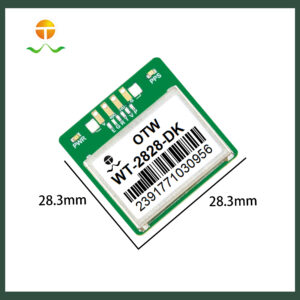
Чистые соединения гарантируют, что встроенный модуль GPS G-Mouse получает стабильное питание.. Они также предотвращают потерю данных во время сеансов высокоскоростной последовательной связи..
Устранение распространенных проблем с точностью
| Проблема | Возможная причина | Немедленное решение |
| Смещение высокой позиции | Многолучевые помехи | Отойдите от высоких стеклянных зданий |
| Нет блокировки сигнала | Засорение антенны | Проверьте наличие снега или густой грязи сверху. |
| Медленная скорость передачи данных | Неправильная скорость передачи данных | Сбросьте настройки связи, чтобы 9600+ |
| Непоследовательное время | Колебания мощности | Используйте регулируемый источник питания 5 В. |
| Количество слабых спутников | Радиочастотные помехи | Защитите близлежащую высокочастотную электронику |
Расширенная калибровка для промышленного использования
Требования к точности варьируются в зависимости от простого грузовика и робота.. Некоторым пользователям для решения конкретных задач необходима точность на уровне сантиметра..
Использование дифференциальных поправок
Свяжите свой встроенный модуль G-Mouse в сеть RTK. Это исправляет атмосферные ошибки, которые естественным образом влияют на сигналы GPS.. Он превращает стандартный приемник в высокоточный инструмент.. Это жизненно важно для автономных тракторов и геодезических дронов..
Мониторинг отношения сигнал/шум (ОСШ)
Регулярно проверяйте строки данных NMEA на наличие значений SNR.. Значение выше 35 обычно указывает на очень исправную блокировку сигнала. Если значения падают, искать новые локальные источники помех. Этот упреждающий мониторинг предотвращает повреждение данных еще до его начала..
Последовательность обеспечивает успех навигации
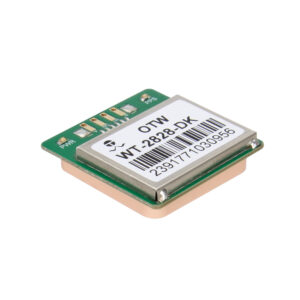
Обслуживание встроенного модуля GPS G-Mouse — простая, но жизненно важная задача.. Это гарантирует, что данные о вашем местоположении остаются достоверными и точными.. Вы защищаете свое оборудование от непогоды и оптимизируете программное обеспечение.. Этот баланс ведет к гораздо более продолжительной и продуктивной продолжительности жизни..
Не игнорируйте небольшие этапы обслуживания в повседневной жизни.. Очистите порты, проверь пломбы, и обновите прошивку. Эти усилия окупаются в критические моменты навигации в полевых условиях.. Ваша система вознаградит вас высочайшей стабильностью и точностью.. Начните план профессионального технического обслуживания сегодня, чтобы поддерживать свой автопарк в рабочем состоянии..